
Demo, live and the way out
Before money goes in, three things are worth knowing from the help pages: what a practice account can copy, what the start steps are, and how copying is stopped. This page lists them as the pages state them, read on 6 November 2026, and marks what only the broker can answer.
What a practice account can copy
The help page says demo accounts deal with virtual funds and can copy only free strategies, if the provider allows it, while live accounts deal with real funds and can copy any strategy. Brokers regulate this by giving each investor a membership type: full membership, where an account can copy any available strategy, or demo membership, where it can copy only free strategies. The page says to check the membership type before starting.
On the strategy list, demo strategies are marked with a blue Demo icon and always free to copy, because they deal with virtual funds only. Live strategies carry a green Live icon and can be free as well, and the page notes that the providers of live strategies set fees, described further down this page. The front page of cTrader Copy repeats the demo rule in its question-and-answer part. Whether FxPro lets a demo account follow a strategy is not on the pages read; it is something to ask FxPro.
The steps to start, in the page's order
Choose a strategy in the list and press Start copying. In the window that opens, pick the account the money comes from and type the amount, which must be at least the strategy's minimum investment. Confirm the terms. The funds then move into a special copy-trading account, and that account begins to copy the strategy.
The page adds that the fee information sits on the Start copying button, and that hovering over the information icons explains the fields. This site cannot read that button, which is inside the application, so the fees a given strategy charges are not on this site.
What happens to positions already open
A provider may already have positions open when a follower joins. The page says that after copying starts, the platform attempts to open new positions to match the provider's current ones, and the overview page says the existing positions are opened at the current market rates. A position the provider opened earlier therefore has a different entry price on the follower's account. No figure for that difference is printed on the pages read.
The equity stop loss
A follower can set a level of equity below which copying stops and every copied position is closed; the funds then go back to the parent account. The page's warning is plain: it is not a guaranteed stop-out price, and the final equity may be lower than the level because of volatility, price gaps, liquidity or technical factors. If funds are removed so that the copy account falls below the chosen level, the stop loss is removed automatically.
How copying is stopped
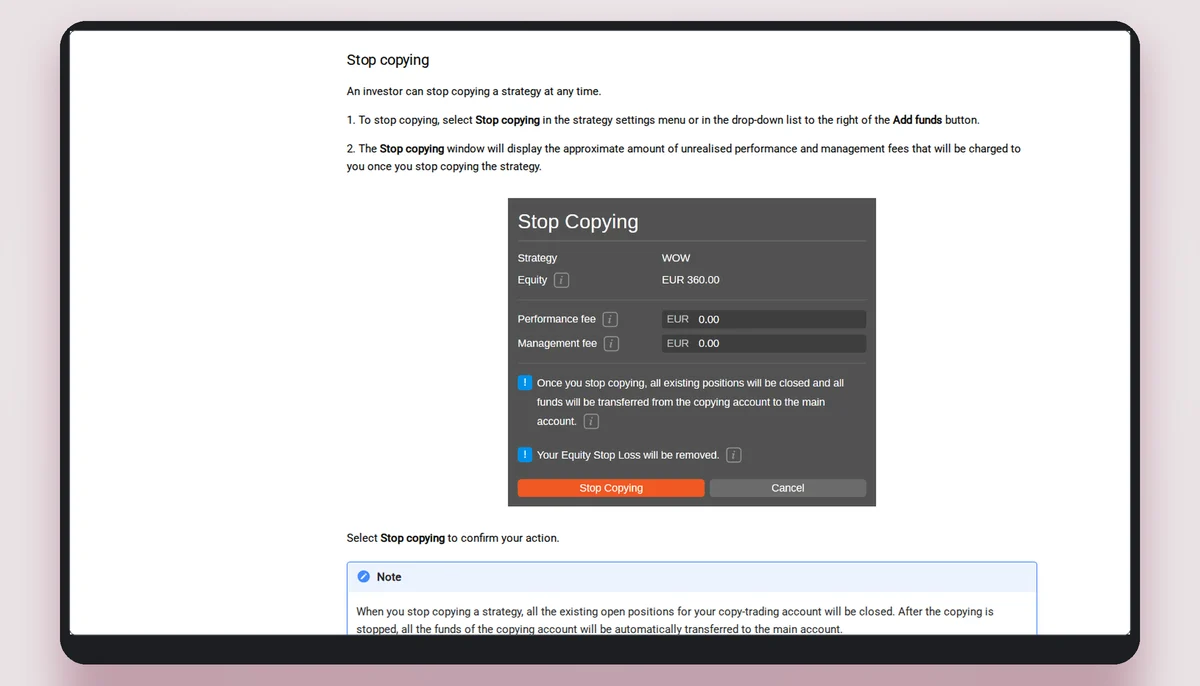
The page says an investor can stop copying a strategy at any time. The Stop copying window shows the approximate unrealised performance and management fees that will be charged. On confirmation, all open positions of the copy-trading account are closed and the funds are transferred to the main account. If the market for a position is closed, the account shows the Stopping status until it opens. If the application cannot be reached, the page says to contact the broker, which can close the positions manually if it offers that service.
Stopping and the open positions are therefore one step in the help page's description: the positions close as part of stopping. What the closing price will be is not stated.
The four status words of a copy-trading account
The investing page names the states a copying account can show. Source: help.ctrader.com/ctrader-copy/investing-in-strategies, read on 6 November 2026.
| Status | What the help page says it means |
|---|---|
| Started | The copying process is on. |
| Stopped | The copying process is off. |
| Stopping | Copying is being stopped; once the open positions are closed and fees charged, the status changes to Stopped. |
| Close only | New positions are not copied, only closing ones; possible due to specific broker conditions, and the page says to contact the broker. |
Restarting
An investor can restart copying at any time while the strategy is still provided and the funds are sufficient, and has to enter the invested volume again. If the copy account holds less than the strategy's minimum investment, restarting waits until funds are added.
In brief
Read next
Beginner questions, answered from the pages
Can a demo account copy any strategy?
No. The help page says it can copy only free strategies, and only if the provider allows demo copying.
What marks a demo strategy in the application?
A blue Demo icon; live strategies carry a green Live icon.
Does stopping close the open positions?
Yes. The help page says all existing open positions of the copy-trading account are closed when copying is stopped.
Does this site know whether FxPro's demo accounts can follow a strategy?
No. That is on no page this site read; ask FxPro.
The broker this site links to
This site links to FxPro, which cTrader's list marks as a copy-enabled broker. A copied trade is a leveraged contract on a price, not ownership of anything. Read the terms before you decide anything.